
Most ISE profiling guides will walk you through enabling probes, building a profiling policy, and watching an endpoint ...
Most ISE profiling guides will walk you through enabling probes, building a profiling policy, and watching an endpoint get classified as a Microsoft-Workstation. That's the visible half of profiling. The invisible half — and the half that determines how your deployment performs and how quickly you can troubleshoot it — is what happens to an endpoint's attributes after they're collected: where ISE puts them, how it keeps them consistent, and what each of those choices costs.
That second half is where things get interesting — and it's covered in depth in an excellent recent Cisco TAC session on troubleshooting profiling. I'd encourage you to watch it in full. Here I want to pull out one piece of it that every ISE administrator should have in their head: where endpoint attributes actually get stored.
This matters for a practical reason. Profiling-related problems rarely announce themselves as "profiling problems." They show up as nodes drifting out of sync, PSNs under sustained load, or a screen full of endpoint data that looks wrong even though access is working fine. Each of those symptoms points back to a specific place ISE stores attributes — and once you know where attributes live and what each location is for, those symptoms stop being mysterious and start being a map. So it's worth slowing down on a deceptively simple question: when ISE learns something about an endpoint, where does that information actually go?
It goes to one of three places:
- Configuration database — the central, replicated store of record. Consistent and durable, but expensive to write to.
- Endpoint cache — a fast in-memory store on each PSN. Quick, but volatile and node-local.
- Context Visibility database — a separate search store behind the GUI. Built to query at scale, but not where access decisions are made.
Each one is built for a different job, and each one points at a different kind of problem when something breaks. Let's take them in turn.
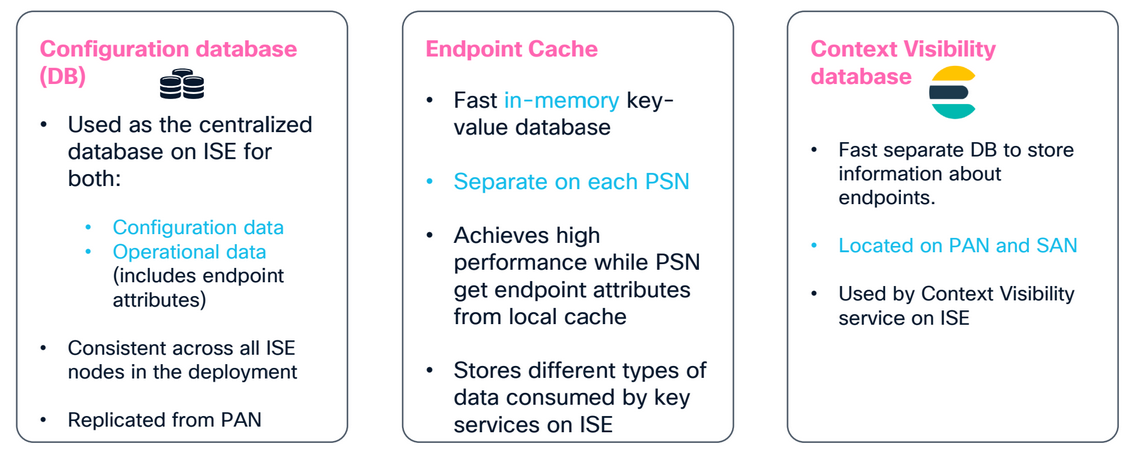
The Configuration Database
The first is the configuration database — the same central store that holds your policies, network device definitions, and identity mappings. When you change a policy on the PAN and watch it appear across the deployment, that's this database doing its job. What's less obvious is that it doesn't only hold configuration data. It also holds operational data, and that includes the endpoint attributes profiling cares about.
Storing attributes here buys you consistency and resiliency. The PAN manages the data and pushes it outward, so it survives a reload or a failover. But it's expensive. Database reads and writes cost more than you'd think, and the cost climbs when it's operational data churning rather than the odd config change. Push too many endpoint updates through this path and the database work — and the replication that follows it — becomes a bottleneck.
This is the store to suspect when the symptom is deployment-wide: nodes marked out of sync, replication failing or running slow, PSNs busy with no obvious authentication load to explain it. Profiling is a frequent culprit precisely because endpoint attributes can take this expensive path, and an attribute that churns is an attribute that replicates.
The Endpoint Cache
The endpoint cache is a fast, in-memory store that lives on each PSN. Because it's in memory, it's quick, which is the whole point — a PSN making an authorization decision wants the endpoint's attributes immediately, not after a round trip to the database. The flip side is that it's volatile — restart the service or reload the node and the cache is flushed and rebuilt.
The important wrinkle is that this cache is separate on every PSN. It isn't replicated the way the configuration database is. Instead, ISE leans on a single idea to keep it sane: for each endpoint, one PSN is designated the owner, and that owner holds the complete set of that endpoint's attributes in its cache. Other PSNs may hold partial information, and when they need the full picture they make a remote call to the owner, pull what they need, and merge any updates back. So the endpoint cache isn't one shared store at all — it's a collection of independent caches, with one node acting as the authoritative copy per endpoint and the rest treating it as the source of truth.
This is the store to think about when behavior is uneven — fast or correct for some endpoints and not others, or different depending on which PSN handled the request. That asymmetry is the cache and the owner relationship showing through, and it usually means the question to ask is "which node owns this endpoint, and can the others reach it?"
The Context Visibility Database
The third store exists for one reason: the GUI. When you open Context Visibility and search, filter, and sort across large volumes of endpoints, you're querying an Elasticsearch instance built to aggregate and search at that scale. It runs on the administration nodes and is populated by profiling — the same classification work that updates the cache also persists relevant data here so the UI has something to show.
This is the store to suspect when the symptom is purely visual: Context Visibility shows stale, missing, or odd-looking endpoint data, but authentication and authorization are working correctly. Because this database is separate from the one PSNs use to make decisions, the GUI can be wrong while enforcement is right — and knowing that keeps you from chasing an authorization problem that doesn't exist.
Conclusion
ISE doesn't keep everything in one place because no single store does all three jobs well. The configuration database is consistent and durable but expensive. The endpoint cache is fast but volatile and node-local. Context Visibility is built for search but isn't where decisions get made. Profiling needs all three properties, so it uses all three stores, and it routes each attribute to the one that fits.
The practical value is in narrowing things down fast. Deployment-wide replication and sync trouble points at the configuration database. Uneven behavior that depends on which PSN handled the request points at the cache and ownership. A GUI that disagrees with what's actually being enforced points at Context Visibility. Knowing which store owns which symptom means you start looking in the right place instead of working through all three.