
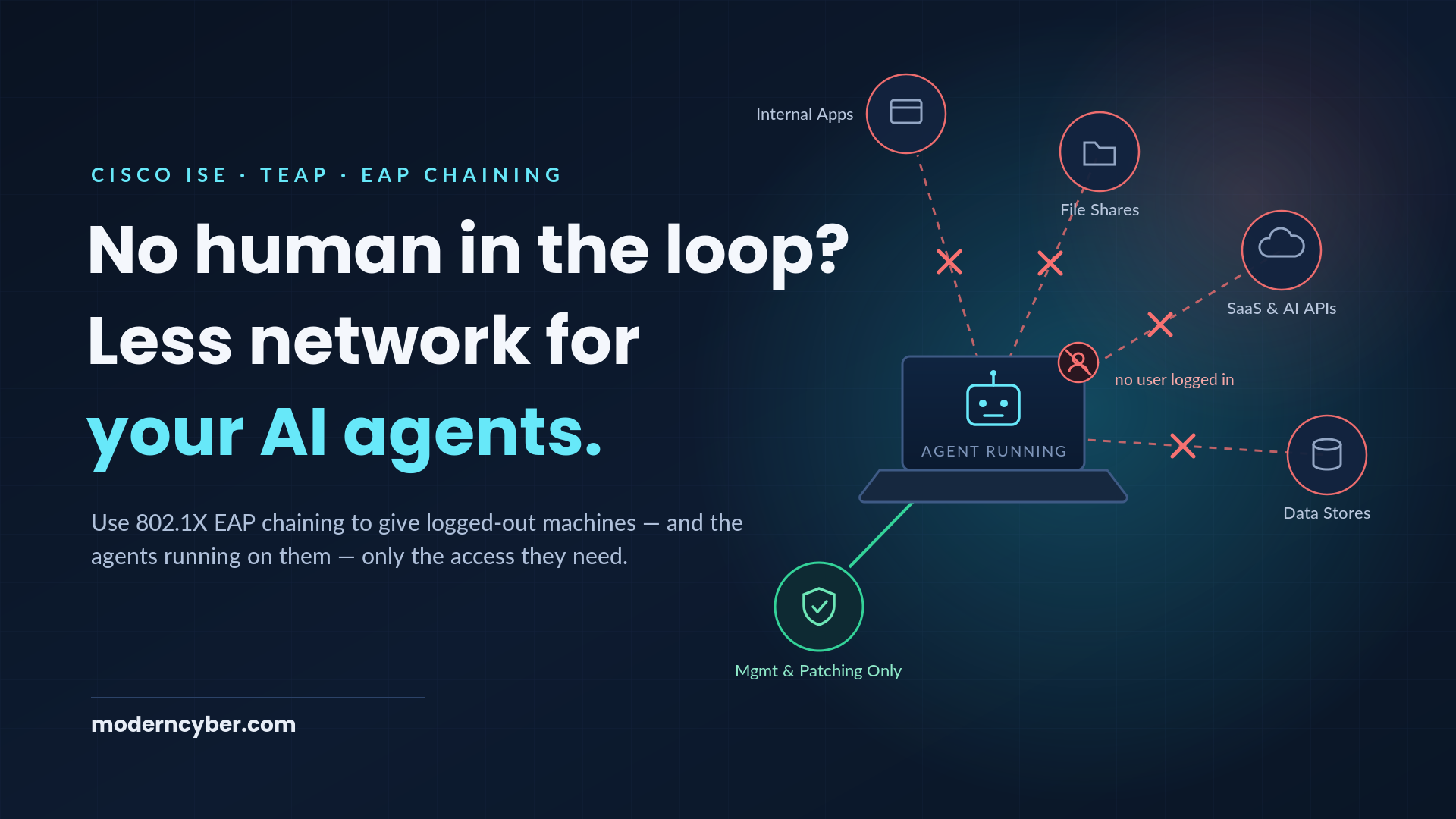
AI agents have officially moved off the whiteboard and onto the corporate endpoint. Copilots, desktop assistants, and increasingly autonomous agents are running directly on end-user PCs — reading files, calling APIs, opening tickets, and writing code. And unlike the humans they work for, they don't go home at 5 o'clock.
That last part is the problem. An agent running on a logged-out (or simply abandoned) workstation still has everything the machine has: local applications, cached credentials, tokens, and — most importantly for this post — the machine's network access. If your authorization policy grants the same access to a dormant machine at 2:00 AM as it does to an employee actively working at 10:00 AM, then your AI agents have no meaningful guardrails the moment the human walks away.
Here's the good news: if you own Cisco ISE, you already own the control point to fix this. The network has always known something that your endpoint stack has a hard time proving — whether a human is actually logged in. With TEAP and EAP Chaining, ISE can distinguish a machine-only authentication from a machine-plus-user authentication and assign completely different network access to each. No new licenses, no new agents, no forklift.
The New Risk: Agents Without a Human in the Loop
Every Zero Trust conversation we have starts with the same three principles: remove implicit trust, enforce risk-based least privilege, and assume compromise. Now apply those principles to an AI agent on an end-user PC:
- Remove implicit trust — An agent inherits the trust of the machine it runs on. If the machine is trusted 24/7, so is the agent. Should it be?
- Enforce least privilege — Does a background process on an unattended workstation need to reach your ERP, your file shares, and the open internet? Or does it need domain services and patching infrastructure, full stop?
- Assume compromise — A hijacked or misbehaving agent (prompt injection is a real and growing attack vector) is most dangerous when nobody is watching it work. Which is exactly when it has the most uninterrupted time on the network.
The risk isn't hypothetical. Agents can act on local applications and stored credentials to "continue working" long after the human who kicked off the task has logged off. Whether the outcome is a runaway automation, unsupervised data movement, or an attacker piggybacking on an agent's access, the common denominator is the same: no human in the loop, and no reduction in network privilege to compensate.
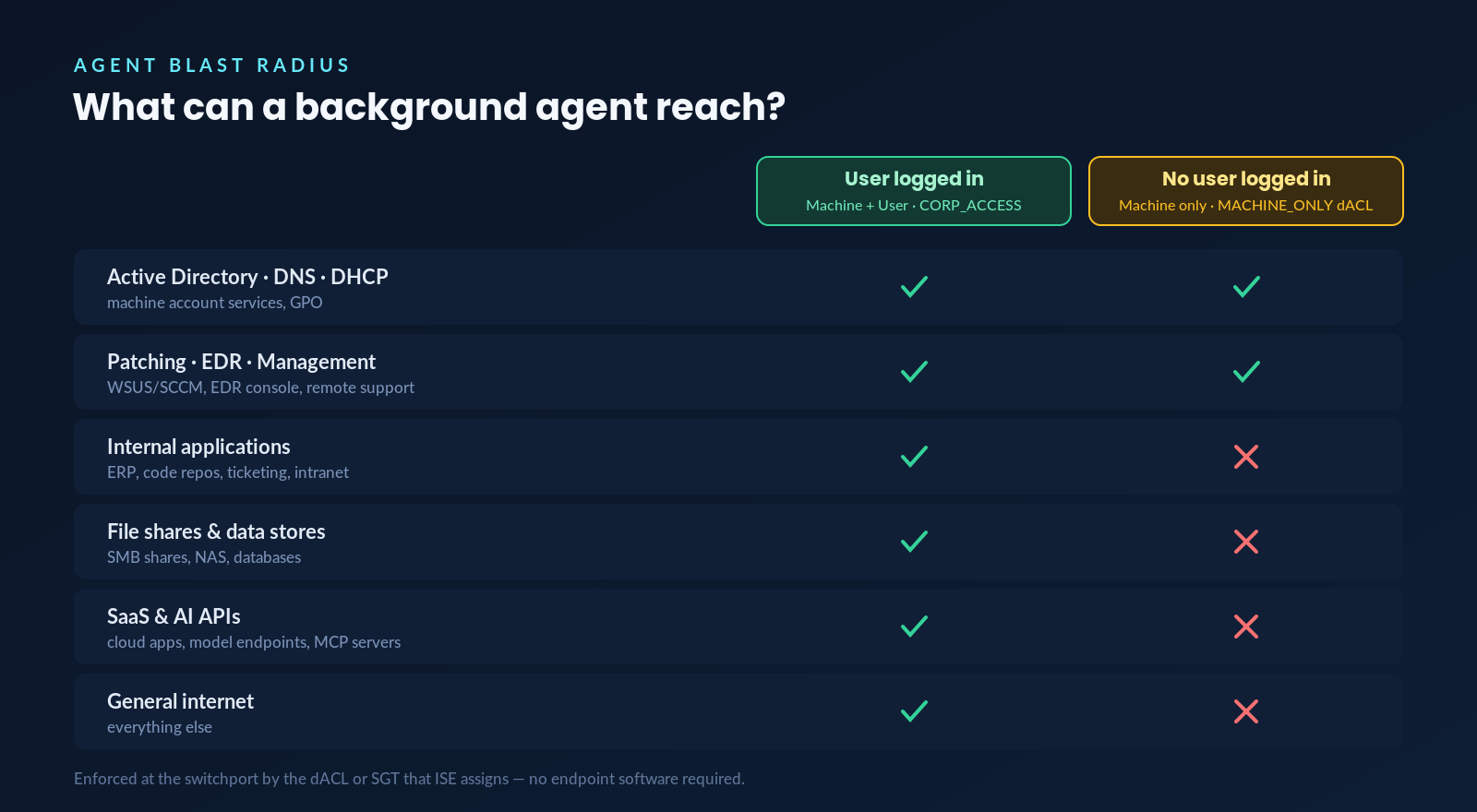
Figure 1: The target end-state — network reach of a background agent by login state
The figure above is the outcome we're going to build: when a user is logged in, the endpoint gets full corporate access. When no user is logged in, the machine — and every agent on it — gets management-plane access only. The agent can't browse your file shares or phone out to model APIs at 2:00 AM, because the switchport won't let it.
The Insight: 802.1X Already Knows When a Human Is Present
Back in 2023 we published a full walk-through of TEAP and EAP Chaining with Cisco ISE, covering the server-side and client-side configuration in detail. If you're starting from scratch, read that first — everything below builds on it.
The short version: TEAP (RFC 7170) allows the Windows native supplicant to pass both the machine credential and the user credential inside a single EAP conversation, cryptographically bound together. ISE evaluates the result and exposes it as a policy attribute called Network Access · EapChainingResult, with four possible values:
- No chaining
- User and machine both succeeded
- User failed and machine succeeded
- User succeeded and machine failed
Most deployments use these values to answer the classic question, "is this a corporate user on a corporate device?" But look at the third value again. "User failed and machine succeeded" is exactly what a logged-out machine looks like. The supplicant sends the machine certificate, sends anonymous for the missing user credential (via TEAP's identity privacy setting), and ISE knows — with cryptographic certainty — that a corporate asset is on the wire with nobody at the keyboard.
That's not a failure condition. That's a signal. And when the user logs back in, Windows re-authenticates with both credentials and ISE re-authorizes the session automatically. Human presence becomes a live, network-enforced policy condition.
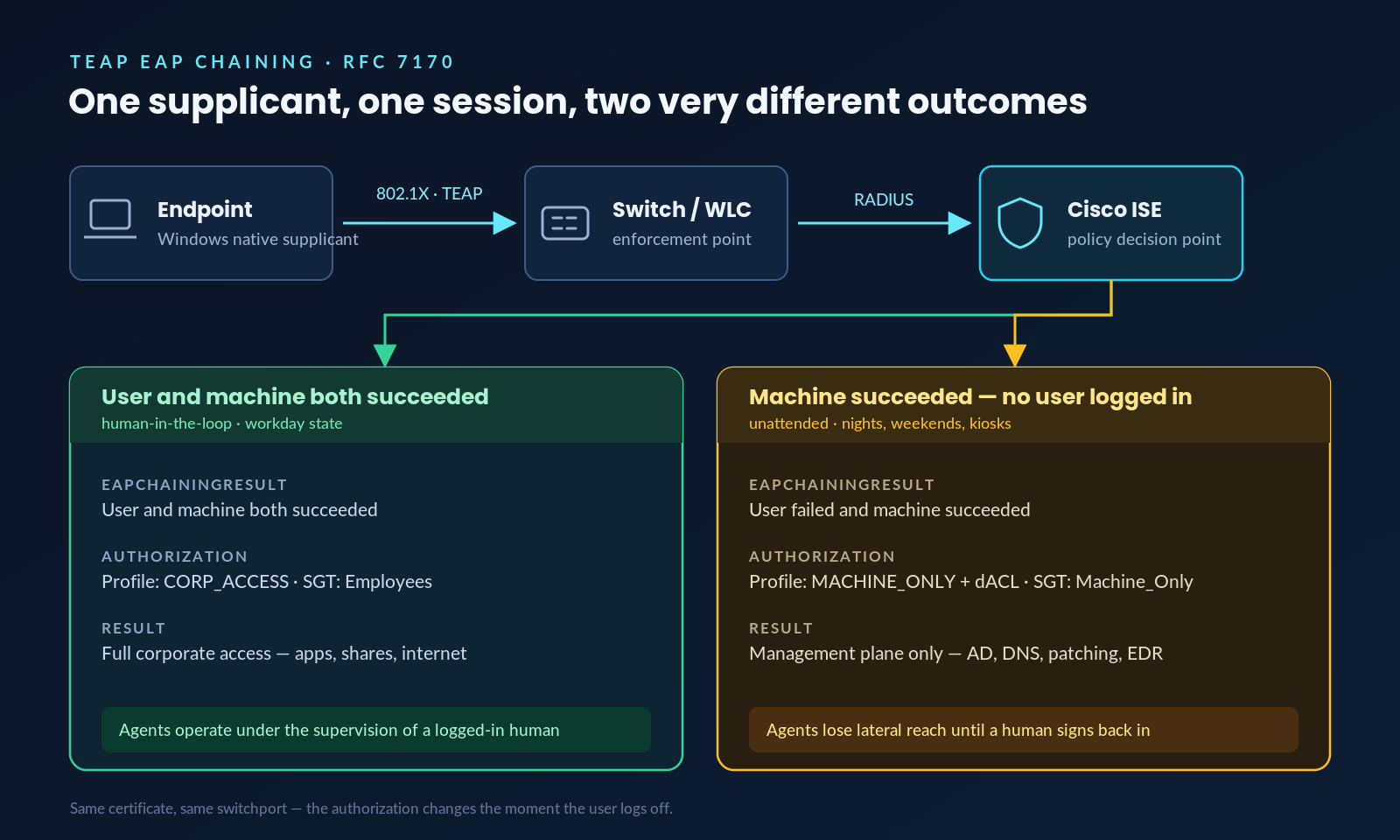
Figure 2: One supplicant, one session — the authorization changes the moment the user logs off
Building the Policy in ISE
Everything below was captured on ISE 3.x. We'll assume TEAP is already working per the earlier post; the focus here is shaping authorization around human presence.
Step 1: Confirm EAP Chaining Is Enabled
Under Policy > Policy Elements > Results > Authentication > Allowed Protocols, verify TEAP is enabled with the Allow EAP Chaining checkbox selected, along with your inner methods (EAP-TLS for the machine, and EAP-TLS or EAP-MSCHAPv2 for the user).
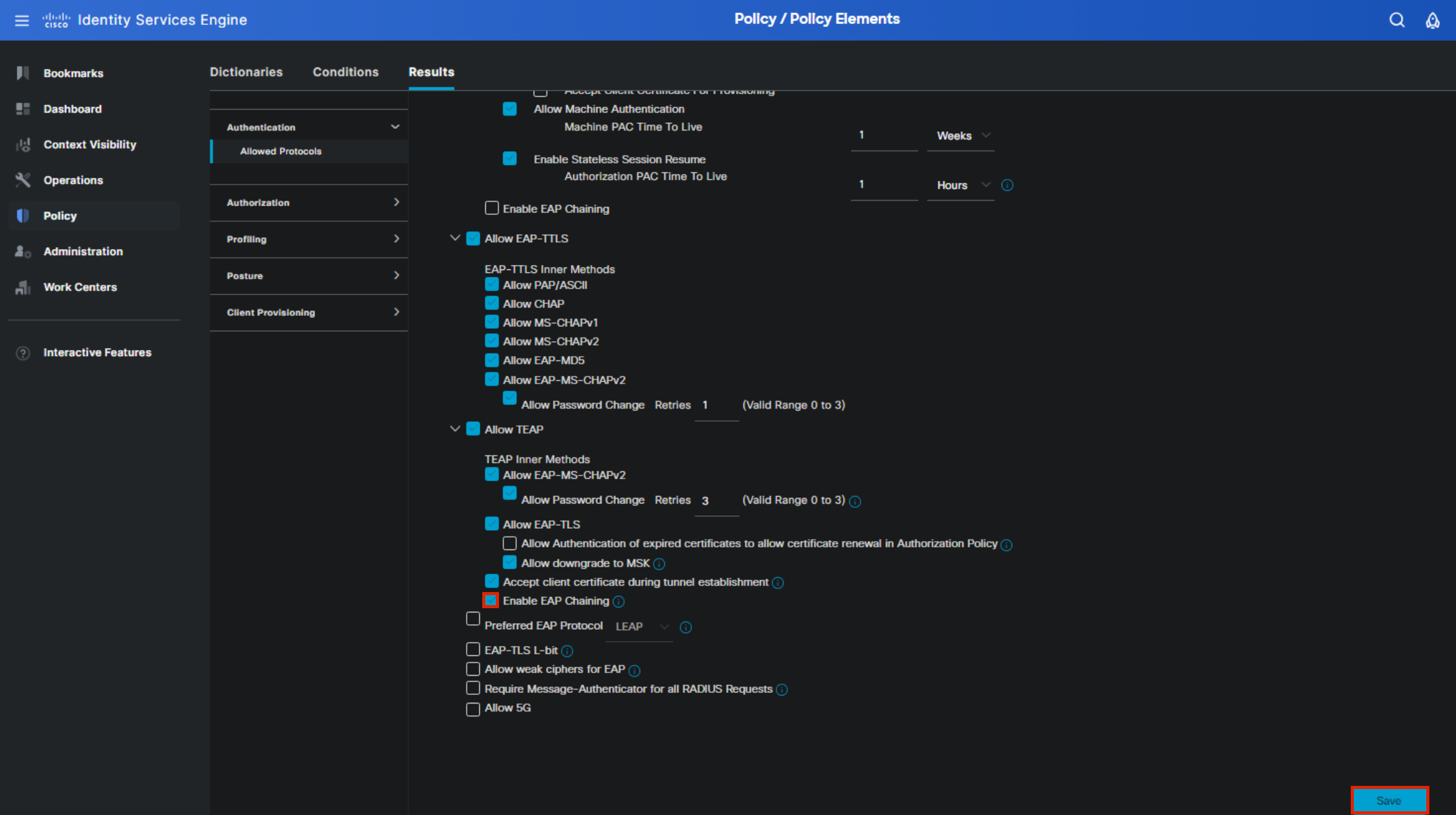
Figure 3: TEAP settings within the ISE Allowed Protocols configuration
Step 2: Build Authorization Rules Around EapChainingResult
This is where the use case comes to life. In your policy set's authorization policy, open the Conditions Studio and select the Network Access dictionary, then the EapChainingResult attribute.
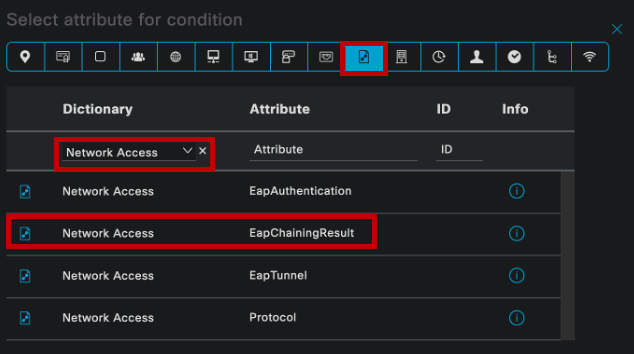
Figure 4: Selecting the EapChainingResult attribute in the Conditions Studio
Create a rule for the unattended state by setting the condition to User failed and machine succeeded:
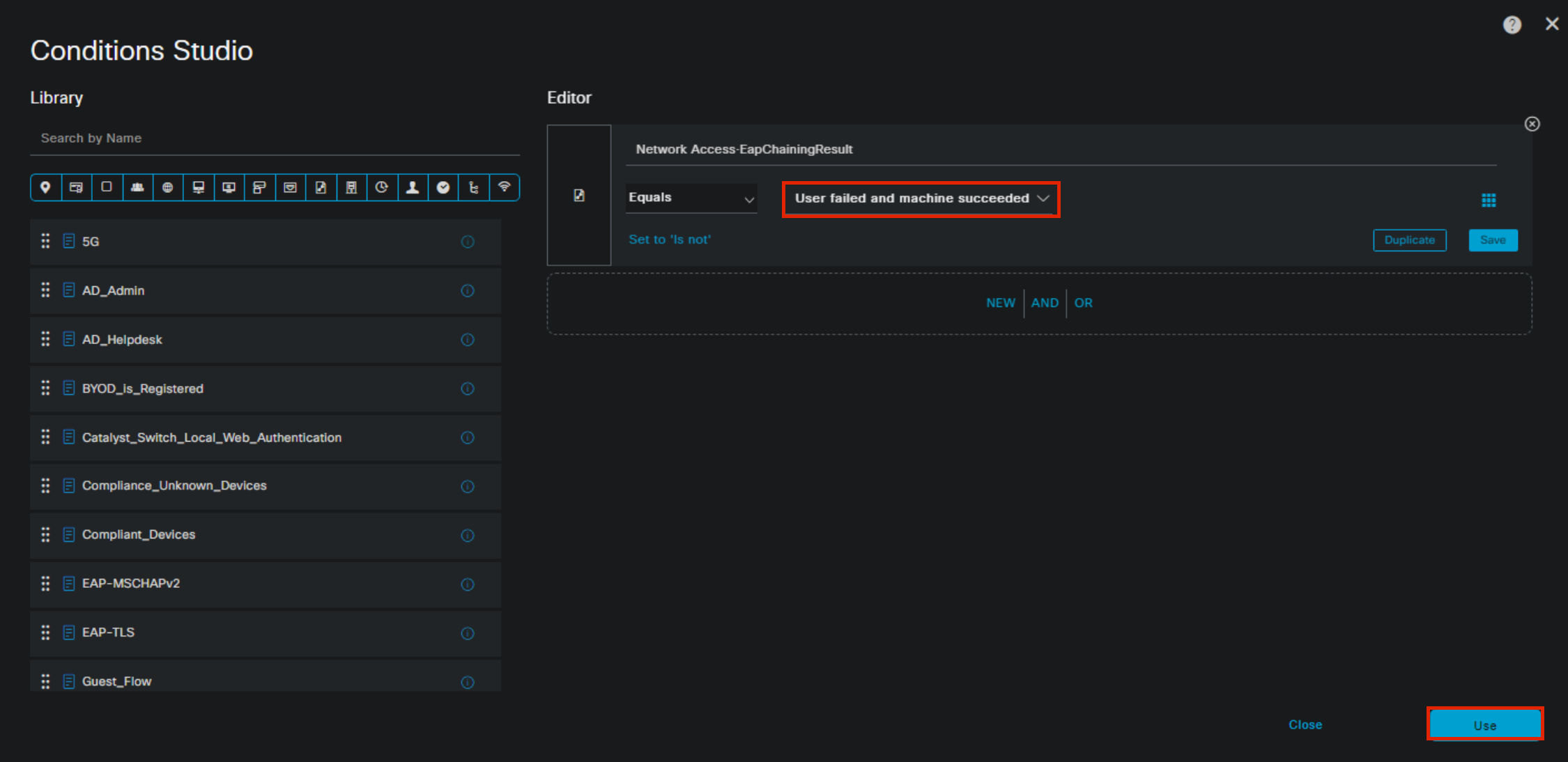
Figure 5: The condition that identifies a corporate machine with no user logged in
Then build out the full set of chaining outcomes. In our lab, the finished authorization policy looks like this — one rule per state, each mapped to a different result:
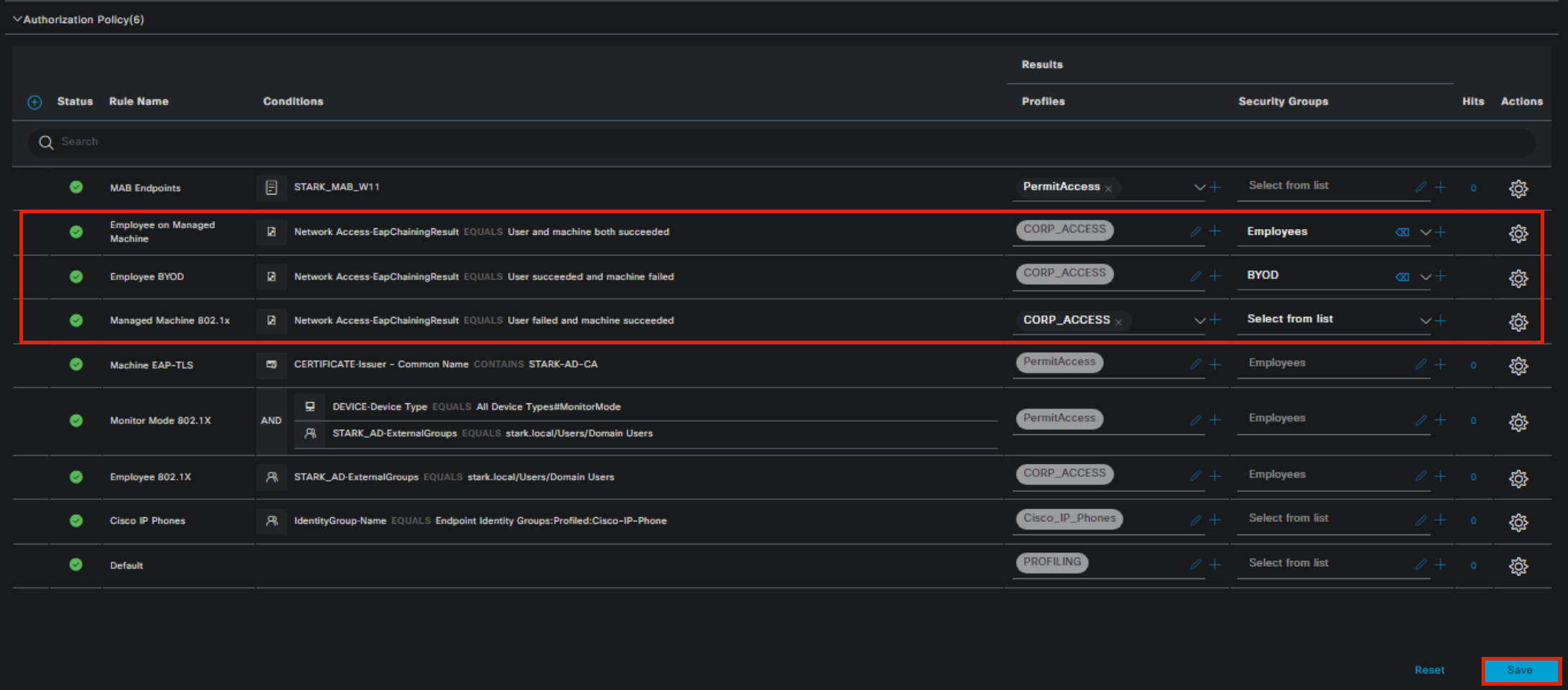
Figure 6: Authorization rules covering each EAP chaining outcome
- Employee on Managed Machine —
User and machine both succeeded→ full corporate access, SGT: Employees - Employee BYOD —
User succeeded and machine failed→ restricted or guest-style access - Managed Machine 802.1X —
User failed and machine succeeded→ this is our target. In the lab it maps to CORP_ACCESS; in production, this is the rule you tighten.
A note on rule design: because the EapChainingResult values are mutually exclusive, rule ordering is largely a matter of style. We like putting higher-privilege rules toward the bottom of the set.
Step 3: Enforce Least Privilege with a dACL
For the machine-only rule, create a dedicated authorization profile (call it something like MACHINE_ONLY_ACCESS) and attach a downloadable ACL that permits exactly what an unattended corporate machine legitimately needs — domain services, patching, endpoint management — and nothing else:
! MACHINE-ONLY-DACL — logged-out corporate assets
permit udp any any eq domain
permit udp any any eq bootps
permit udp any any eq ntp
remark Active Directory / GPO
permit tcp any 10.10.5.0 0.0.0.255 eq 88
permit tcp any 10.10.5.0 0.0.0.255 eq 389
permit tcp any 10.10.5.0 0.0.0.255 eq 445
permit tcp any 10.10.5.0 0.0.0.255 eq 636
remark Patching & endpoint management
permit tcp any host 10.10.8.20 eq 8530
permit tcp any host 10.10.8.30 eq 443
remark Everything else — including SaaS, AI APIs, shares — denied
deny ip any any
The dACL is applied at the switchport (or WLC) the moment ISE authorizes the session. There is nothing for an agent on the endpoint to bypass, disable, or socially engineer — the enforcement lives in the network, below the operating system the agent runs on.
Tune the list to your environment, and lean on ISE's Live Logs while you do: dACL hit behavior will quickly show you what your fleet actually needs while logged out (hint: it's less than you think, and what shows up will teach you a lot about your agents).
Step 3b: Or Enforce It with SGTs
If you've deployed Cisco TrustSec, assign a Machine_Only SGT in the same authorization rule instead of (or alongside) the dACL. Then write your SGACLs so the Machine_Only group can reach management services but not production applications or data:
Machine_Only → Mgmt_Services: permit (AD, WSUS, EDR, remote support)Machine_Only → Corp_Apps: denyMachine_Only → Data_Stores: deny
The SGT approach scales beautifully because the intent ("this is an unattended machine") travels with the traffic and is enforced consistently across your campus, data center, and firewalls — and it gives your SOC a clean, filterable label for "traffic generated with no human present," which is a surprisingly useful hunting pivot.
The Client Side
One Windows setting makes this whole state machine work: on the endpoint's 802.1X configuration, set the authentication mode to User or computer authentication. That instructs the supplicant to authenticate as the machine when nobody is logged in, and as machine + user when someone is.
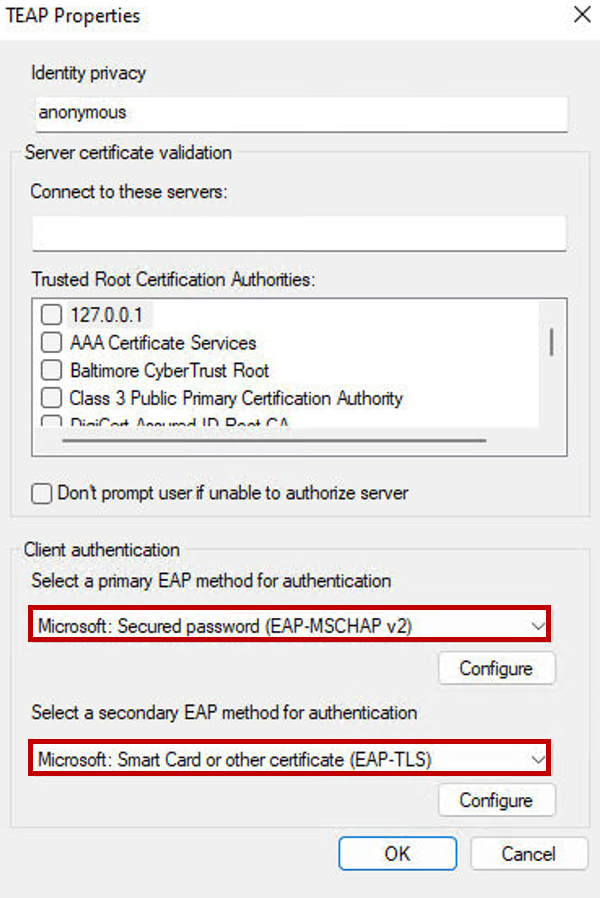
Figure 7: Windows TEAP supplicant with primary and secondary EAP methods configured
The complete client-side walk-through (identity privacy, server certificate validation, primary/secondary methods) is in the original TEAP post.
Verify It — Then Break It
As we said last time: test, test, and test again. Log a user in, and confirm in Operations > RADIUS > Live Logs that the session shows both identities (host/machine and DOMAIN\user), the authentication protocol reads TEAP (EAP-TLS, EAP-MSCHAPv2), and the Employee on Managed Machine rule fires.
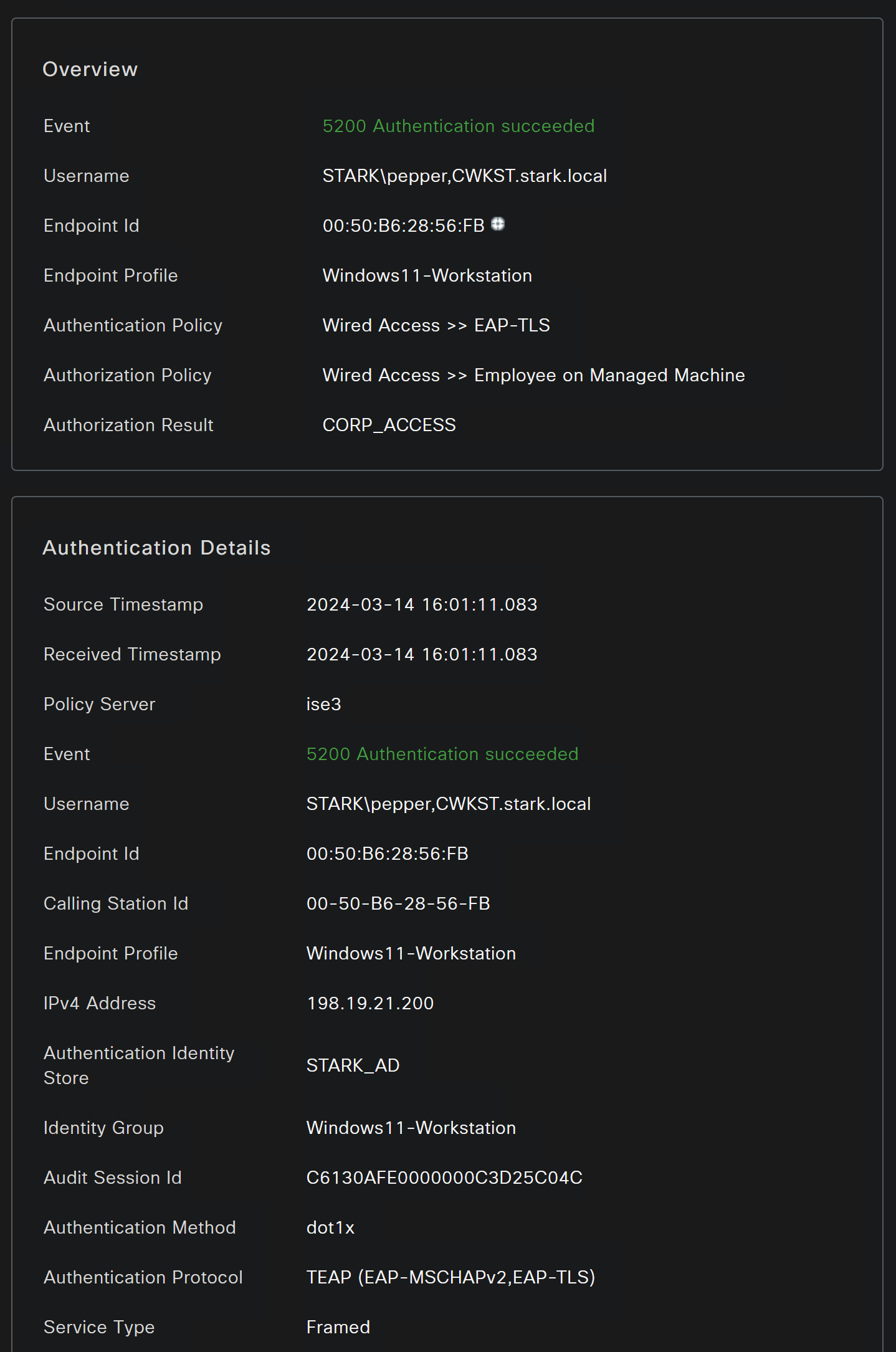
Figure 8: Live Log detail showing chained machine and user authentication via TEAP
Then log the user out, watch the supplicant re-authenticate as machine-only, and verify the Machine_Only rule and dACL are applied. Finally, try to be your own adversary: from the logged-out machine (a scheduled task running as SYSTEM works nicely as a stand-in for a background agent), attempt to reach a file share, an internal app, and an external API. Watching those connections die at the switchport is the whole point of the exercise.
A Few Honest Caveats
This control maps network privilege to login state, and it's worth being precise about what that does and doesn't cover. A locked workstation still has a logged-in user, so the session retains user-level access — pair this with sensible screen-lock and idle-logoff policies (and reauthentication timers) to shrink that window. Agents running as system services get machine-only access at all times under this model, which is usually exactly what you want. And network containment is one layer, not the whole answer: identity governance for agents, endpoint controls, and egress security still matter. But as guardrails go, this one is refreshingly durable — it's enforced below the endpoint, it requires no cooperation from the agent, and it fails closed.
What we like most about this use case is what it says about the platform you already own. ISE has quietly become the policy engine for problems that didn't exist when most organizations deployed it — and "give unsupervised AI agents less network" is about as 2026 as requirements get. It's a policy update, not a project.
ModernCyber's Services
We spend our days helping organizations get more out of ISE than the deployment they finished years ago — modernizing policy for new requirements like this one through ModernISE Expert and ModernISE Platform. If you'd like a second set of eyes on your policy sets, or you're wondering what other use cases your existing investment can cover, we'd love to talk.
Schedule some time to speak with one of our cybersecurity experts.
See it for yourself. Request a ModernISE Platform test drive at moderncyber.com/testdrive — or reach us at info@moderncyber.com.
Integrated · Agile · Zero Trust · AI