
The October 13, 2026 Windows security update (KB5127648 on Windows 11 24H2, 25H2 and 26H2) silently flipped a default that PEAP-MSCHAPv2 has quietly depended on for twenty years. Wi-Fi and wired 802.1X single sign-on now fails on patched clients. Here is what happened, the registry workaround that buys you time, and why the real fix is certificates: EAP-TLS, or TEAP with EAP-TLS inside.
What broke
Starting Tuesday evening, Windows 11 devices that installed KB5127648 (OS builds 26100.9711, 26200.9711 and 26300.9711) stopped authenticating to WPA2-Enterprise Wi-Fi and wired 802.1X networks that use PEAP with MS-CHAPv2 and "Use my Windows user account" (domain SSO). Microsoft Q&A, Spiceworks and vendor knowledge bases filled up within hours.
The symptoms are consistent across every report we have seen:
- The client reports "There was an internal authentication error" (0x80070285). Wireless shows WLAN-AutoConfig events 12011 → 12014 → 12013; wired shows Wired-AutoConfig 15503 → 15504 → 15514, with reason code 0x50005 and a 600-second block timer that makes the port loop.
- The RADIUS server often never sees a completed attempt. On Cisco ISE, Live Logs show the session start and then nothing useful; on Microsoft NPS, some admins see the request discarded as malformed (Reason Code 3).
- Typing the same domain credentials manually works. WPA2-Personal works. EAP-TLS clients on the same SSID work.
- Uninstalling KB5127648 (
wusa /uninstall /kb:5127648) restores authentication; reinstalling it reproduces the failure.
Microsoft's October release notes do not list this as a known issue, and there is no fix coming, because from Microsoft's side it is not a bug.
Why it happened: this is the NTLMv1 phase-out, not a regression
In August 2025 Microsoft published "Upcoming changes to NTLMv1 in Windows 11 version 24H2 and Windows Server 2025" (KB5066470). Windows had already removed the NTLMv1 protocol, but NTLMv1-derived cryptography survived in one place: the MS-CHAPv2 exchange that PEAP and EAP-MSCHAPv2 use when the supplicant signs on with the logged-on user's Windows credentials. Microsoft gave the plan a timeline:
- September 2025: Windows 11 24H2 and later begin auditing NTLMv1-derived SSO (event 4024 in the Microsoft-Windows-NTLM/Operational log).
- November 2025: audit mode reaches Windows Server 2025.
- October 2026: the October security update changes the default for the
BlockNtlmv1SSOregistry value from Audit (0) to Enforce (1), when the value has never been set. In Enforce mode the SSO request is blocked and logged as event 4025.
That is exactly what KB5127648 did. The update did not create or change a registry value on your machines; it changed what Windows does when the value is absent. Nearly every enterprise fleet never set it, so nearly every enterprise fleet went to Enforce on Tuesday night.
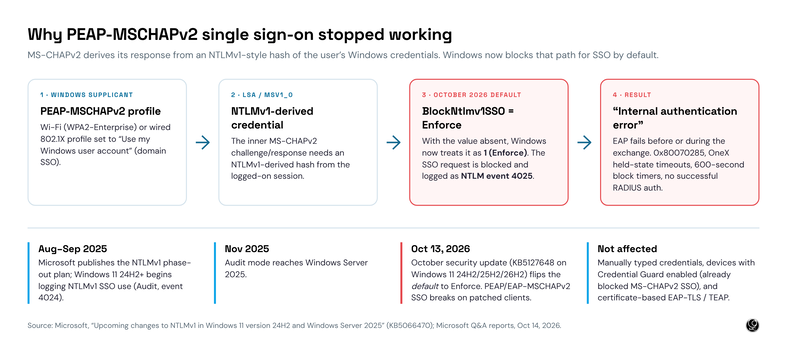
Two groups did not notice. Devices with Credential Guard enabled have blocked MS-CHAPv2 SSO since Windows 11 22H2, so those organizations already moved or already typed credentials. And anyone already on EAP-TLS or TEAP with certificates never used the MS-CHAPv2 path at all. That second group is where you want to be.
How to confirm it is this, and not your RADIUS server
Before you open a TAC case or blame the wireless controller, check the client. The signature is unmistakable.
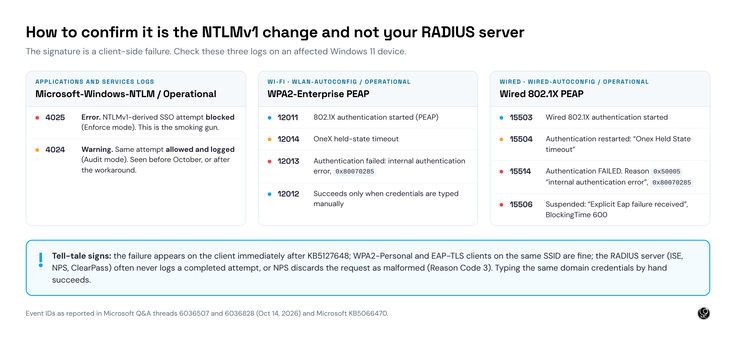
On an affected device, open Event Viewer and look at Applications and Services Logs → Microsoft → Windows → NTLM → Operational. An event 4025 at the moment of each failed 802.1X attempt is the confirmation: Windows itself refused to hand the supplicant an NTLMv1-derived credential. If you see 4024 instead, that device is still in Audit mode (either unpatched or already carrying the workaround) and the failure is something else.
The temporary workaround: set BlockNtlmv1SSO back to Audit
Microsoft's own guidance allows a scoped, temporary exception: explicitly set the value the update left undefined. Because you are setting it yourself, the new default no longer applies.
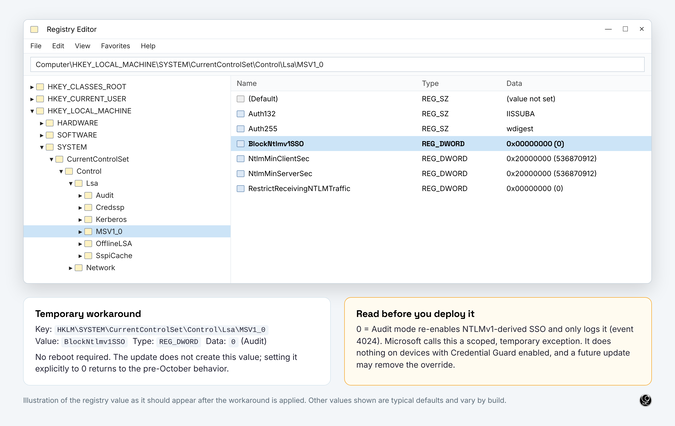
| Key | HKEY_LOCAL_MACHINE\SYSTEM\CurrentControlSet\Control\Lsa\MSV1_0 |
| Value name | BlockNtlmv1SSO |
| Type | REG_DWORD |
| Data | 0 (Audit mode: allowed and logged as event 4024) — the default now behaves as 1 (Enforce) |
| Reboot | Not required |
From an elevated prompt on a single machine:
reg add "HKLM\SYSTEM\CurrentControlSet\Control\Lsa\MSV1_0" /v BlockNtlmv1SSO /t REG_DWORD /d 0 /fAt fleet scale, push it the way you push everything else: a Group Policy Preferences registry item (Computer Configuration → Preferences → Windows Settings → Registry) scoped to the OUs that still use PEAP, or an Intune remediation script for Entra-joined devices. Target only the devices that need it, so your audit trail stays honest about who is still on MS-CHAPv2.
Three caveats, because this is a workaround and not a fix:
- You are re-enabling the thing Microsoft is trying to remove. Audit mode permits NTLMv1-derived SSO; it only logs it. Microsoft's document says plainly that it "should not be used long term."
- It does nothing on devices with Credential Guard enabled. Credential Guard blocks MS-CHAPv2 SSO on its own, and the registry value does not override it.
- It is one Windows update away from being ignored. Microsoft removed the NTLMv1 protocol already; the override for its remaining derivative will not live forever.
Do not uninstall KB5127648 to get around this. It is a cumulative security update, and the registry value gets you the same result without giving up October's fixes.
The real fix: migrate to EAP-TLS, or TEAP with EAP-TLS inside
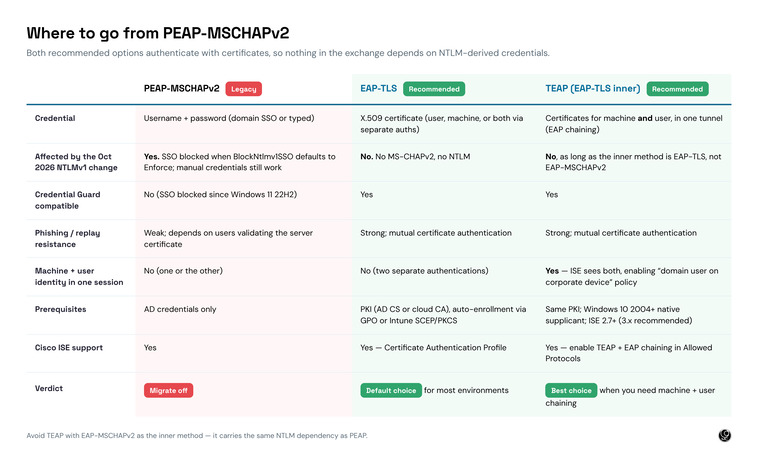
PEAP-MSCHAPv2 has been on borrowed time for years. It depends on users validating a server certificate they do not understand, it hands a password-derived response to anyone who can stand up a convincing evil twin, and it is now fighting the operating system it runs on. The October update is the push most organizations needed to finish a migration they already knew they owed.
EAP-TLS: the default choice
EAP-TLS authenticates with an X.509 certificate instead of a password. There is no inner method, no MS-CHAPv2 and no NTLM anywhere in the exchange, so nothing in the October change can touch it. It is supported by every Windows supplicant you have, every Cisco ISE release you are running, and every switch and wireless controller on your network. If you have a PKI (Active Directory Certificate Services or a cloud CA) and a way to auto-enroll certificates (Group Policy for domain-joined devices, Intune SCEP or PKCS for Entra-joined devices), you have everything EAP-TLS needs.
TEAP with EAP-TLS inner: the best choice when you need machine and user together
TEAP (RFC 7170) is a TLS tunnel that carries one or more inner EAP methods and, crucially, supports EAP chaining: the machine certificate and the user certificate are both presented in a single authentication, and ISE sees both identities in one session. That lets you write the policy everyone actually wants, "this domain user on this corporate-owned device," without the awkward machine-access-restriction workarounds that plain EAP-TLS needs. The native Windows supplicant has supported TEAP since Windows 10 2004, and Cisco ISE has supported it since 2.7.
One rule: the inner method must be EAP-TLS. TEAP with an EAP-MSCHAPv2 inner method carries the same NTLM dependency as PEAP and breaks the same way. If you are going to the trouble of deploying TEAP, go all the way to certificates for both legs.
What the migration looks like
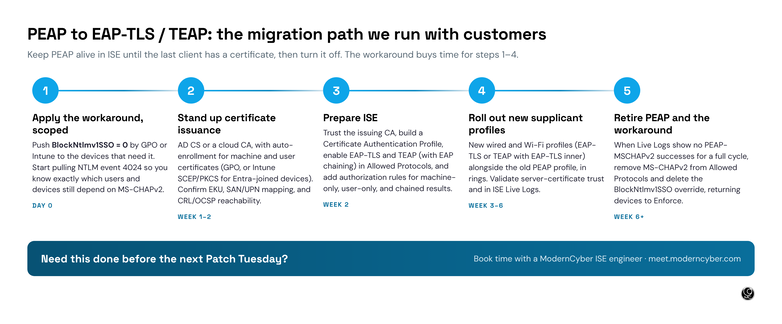
- Apply the workaround, scoped. Get people working again today, but only on the devices that need it, and start collecting NTLM event 4024 centrally. In a week you will know exactly which users and devices still depend on MS-CHAPv2.
- Stand up certificate issuance. Confirm your CA, your templates (Client Authentication EKU, UPN or DNS name in the SAN), auto-enrollment, and CRL or OCSP reachability from the ISE policy service nodes. This is usually the longest step and the one most organizations underestimate.
- Prepare ISE. Import the issuing CA chain into the trusted certificates store with "trust for client authentication," create a Certificate Authentication Profile that maps the certificate identity to your identity source, and enable EAP-TLS and TEAP with EAP chaining in your Allowed Protocols. Add authorization rules for machine-only, user-only and chained results. Leave PEAP enabled for now.
- Roll out new supplicant profiles in rings. Push the new wired and Wi-Fi profiles (EAP-TLS, or TEAP with EAP-TLS inner) alongside the existing PEAP profile, starting with IT. Validate the server certificate trust settings in the profile, because a supplicant that cannot validate the ISE EAP certificate fails exactly like the problem you are fixing. Watch Live Logs.
- Retire PEAP and the workaround. When Live Logs show no PEAP-MSCHAPv2 successes for a full business cycle, remove MS-CHAPv2 from Allowed Protocols, delete the
BlockNtlmv1SSOoverride, and let the devices return to Enforce, which is where Microsoft wants them and where you want them.
For a typical mid-size enterprise with a working PKI, this is a four-to-eight-week project. Without a PKI it is longer, and the certificate work is the part worth getting help on.
Talk to us before the next Patch Tuesday
ModernCyber has been moving customers from PEAP to EAP-TLS and TEAP on Cisco ISE for years; the October update just put a date on it. If you want a second set of eyes on your plan, help with the ISE policy and certificate design, or someone to run the migration end to end, book time with one of our ISE engineers.
Schedule time with ModernCyber →
And if the thing keeping you on PEAP is that nobody has time to own ISE, that is a different conversation: ModernISE Platform is Cisco ISE delivered as a managed service, and certificate-based authentication is how we build every one of them.
Sources
- Microsoft, "Upcoming changes to NTLMv1 in Windows 11, version 24H2 and Windows Server 2025" (KB5066470)
- Microsoft Q&A, "KB5127648 breaks WPA2-Enterprise (802.1X PEAP) Wi-Fi authentication on Windows 11", October 14, 2026
- Microsoft Q&A, "KB5127648 breaks wired 802.1X PEAP authentication", October 14, 2026
- RFC 7170, Tunnel Extensible Authentication Protocol (TEAP) Version 1
See it for yourself. Request a ModernISE Platform test drive at moderncyber.com/testdrive — or reach us at info@moderncyber.com.
Integrated · Agile · Zero Trust · AI